Angry Birds got you down?
We've all experienced it - long evenings, staying up late, your significant other hounding you to get off your smart phone or iPad.
If you've learned the basics, just remember these five simple rules and you'll be knocking 'em down every time! A few tips to live by.
1. Visualize your attack
This takes practice but it is perhaps the most important tip to take in to any level in any version of Angry Birds. Luck still certainly have a significant impact on your results but don't rely on it. Haphazard planning results in haphazard results. Look at the game field and your birds. Design a plan of attack. It's easy to get frustrated and rush things - DON'T! Take a minute and think about it! Seal Team 6 spends the time to organize a plan and you KNOW their results.
2. Employ Paper and Pencil
This is most important for that one stubborn level that you can never quite beat. It might sound silly but it will get you thinking about what will fall where and which birds will do the best damage to the resulting pile of rubble. Fall angles and trajectories are of critical importance.
3. Levels are designed to be beat
Impossible is not in the vocabulary of Chillingo or Rovio. Sure they make some levels SEEM impossible, but they're not. They're is always a way and always a way that, if done correctly, will work every. Even if you can't figure it out yourself you can always;
4. Google it!
Picking up hints online is a perfectly reasonable approach to beating an app. Don't lose sleep over something you can pick up with a quick search online. You'll be amazed by the number of specific tricks you can find for every single level of every Angry Birds.
5. Destroy the wood
For the advanced Angry Birder it
becomes more about points that anything else. Points are what separates
you from the rest of the pack. The only way to maximize your points is
to maximize destruction. Once you've mastered levels, go back, pull
out the pencil and paper and plan a more vicious attack on the scaffolding.
Showing posts with label iPad. Show all posts
Friday, August 5, 2011
Friday, February 18, 2011
Pik Pok Field Goal Tips and Tricks for iPad
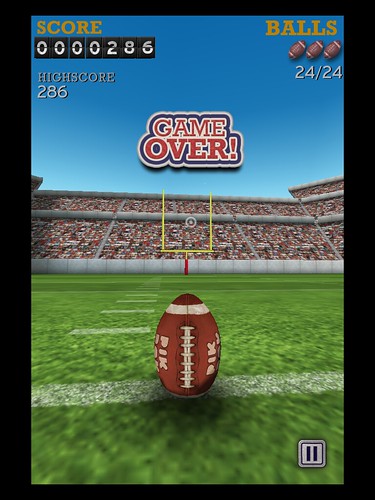
A new addition to the Pik Pok arsenal of apps is the field goal game. While initially hesitant to spend .99 cents on something that from the screen shot looked like another paper toss, I was pleasantly surprised by the gameplay and handling.
After playing for a few days I've been able to master the arcade version with a perfect score of 256. With practice, and a few quick tips, you can get there too.
But first here is a screen shot of my perfect score so you know it's legit.

Here are a few tips:
1. Don't actually flick - The most appropriate motion is essentially a controlled drag of the finger.
2. Extend your kicking motion - If you don't use a long motion of about four inches you run the risk of your kicks falling short
3. Learn the angles for excessive wind - Wind angles of 5 and 6 miles an hour, while initially challenging end up being pretty easy. Start with a pretty dramatic swoop from left to right or right to left based on the wind angle. Straighten the kick throughout the motion so that you are dragging straight up to complete the motion.
After playing for a few days I've been able to master the arcade version with a perfect score of 256. With practice, and a few quick tips, you can get there too.
But first here is a screen shot of my perfect score so you know it's legit.

Here are a few tips:
1. Don't actually flick - The most appropriate motion is essentially a controlled drag of the finger.
2. Extend your kicking motion - If you don't use a long motion of about four inches you run the risk of your kicks falling short
3. Learn the angles for excessive wind - Wind angles of 5 and 6 miles an hour, while initially challenging end up being pretty easy. Start with a pretty dramatic swoop from left to right or right to left based on the wind angle. Straighten the kick throughout the motion so that you are dragging straight up to complete the motion.
Tuesday, February 15, 2011
World Top Ten High Score on Toast Shooter
Unfortunately, Toast Shooter has recently undergone some unfortunate upgrades aimed at increasing total points. I loved the original iPad version release because the game was simple, and without the gimmicky add-ons of the current version. So while the strategy I employ in this video is a touch out dated because of the app version issues, you'll still learn something. Prior to the app update, this recording shows how I got into the top ten global standings on toast shooter for iPad.
Friday, February 11, 2011
Seven Reasons I Hate The Daily App for iPad
A surprise snow day thanks to snowpocalypse afforded me the opportunity to download and test Rupert Murdoch's new app, The Daily. The first iPad only news content app of it's kind. While Murdoch thinks the demise of print news is a long way off, he has invested millions in developing The Daily.
And here are the seven reasons I hate The Daily for iPad.
1. Version issues - Almost as quickly as it was available a new version was available. While updates are expected frequently with an app of this importance, rarely do we iPad users have to physically delete and reinstall an app for it to work.
2. Crashes - I thought for sure the delete and reinstall would clear up the crashes...it didn't.
3. Screen lock - Headlines are generally large and are included on a full screen sized image. Rotating the iPad to portrait mode will allow the reader to access the story. However, if you keep the rotation lock on like I do, you can't ever get to the story.
4. Load times - This is somewhat dependent on your internet quality but if I can stream HD movies, I don't understand why I can't have a seamless transition between articles on a news app
5. Lack of Intuitiveness - Sure the app has articles on instruction but this is an iPad, we should never need instructions on something that is supposed to be our companion news app.
6. Advertisements - This isn't a magazine, why are we dealing with so many advertisements. This brings me to my last reason to hate The Daily for iPad.
7. Price - Murdoch is betting that 99 cents a week sounds insignificant and it does, but no body wants to be in a long term commitment to a new app for a 30 dollar price tag and 99 cents per week adds up.
I'm not giving up on it, and there is certainly some good to go with the bad but so far The Daily fails to deliver.
Friday, January 7, 2011
iPad Camera
By now it's no big secret that the iPad 2 will have a camera. In fact, the more closely guarded secret is when the iPad 2 will be released with some estimates as early as April, 2011.
I doubt it. With the way that information leaked and spread on the release of iPhone 4 I think it's unlikely we will see the much anticipated iPad sequel until the second half of the calendar year.
When I bought my iPad I didn't think that the lack of a camera would be a significant detriment to using it much like a laptop computer, however, the lack of both front and rear-facing cameras quickly became apparent as the most significant flaw of the device.
So now, I like so many other iPad owners am forced with a decision on iPad2. Is it worth it to get another iPad just for the camera?
That is the question. What do you think?
Check out the latest iPad 3 rumor.
I doubt it. With the way that information leaked and spread on the release of iPhone 4 I think it's unlikely we will see the much anticipated iPad sequel until the second half of the calendar year.
When I bought my iPad I didn't think that the lack of a camera would be a significant detriment to using it much like a laptop computer, however, the lack of both front and rear-facing cameras quickly became apparent as the most significant flaw of the device.
So now, I like so many other iPad owners am forced with a decision on iPad2. Is it worth it to get another iPad just for the camera?
That is the question. What do you think?
Check out the latest iPad 3 rumor.
Wednesday, December 22, 2010
iPad Pixel Doubler Disappointment with Retina Display
One of the things that Apple mentioned the most in their early promotion of the iPad was the fact that it would "run all the apps from your iPhone". With the app store still a relatively new concept to people, they were no doubt nervous that the money spent on apps for their phone would essentially be wasted and that if they wanted to enjoy a game on their iPad they would have to pay twice. Apples promotion certainly quelled fears but in the end the pixel doubler simply doesn't deliver.
People still asked the question "does the pixel doubler work well?"
Images and apps look terrible with the pixel doubler. Lifestyle apps or those whose only purpose is something functional certainly do "work" on the iPad but they are sad versions of their phone version selves.
What's even worse is that with the new iPhone 4 retina display, the increased clarity is NOT transferred to the iPad with the pixel doubler. All the increased clarity from the retina display is lost.
There is talk about the retina display coming to iPad2 but that remains to be seen.
-The frustrated pixel doubler.
People still asked the question "does the pixel doubler work well?"
Images and apps look terrible with the pixel doubler. Lifestyle apps or those whose only purpose is something functional certainly do "work" on the iPad but they are sad versions of their phone version selves.
What's even worse is that with the new iPhone 4 retina display, the increased clarity is NOT transferred to the iPad with the pixel doubler. All the increased clarity from the retina display is lost.
There is talk about the retina display coming to iPad2 but that remains to be seen.
-The frustrated pixel doubler.
Tuesday, December 21, 2010
Removing Rotation Lock on iOS 4.2 on iPad
The long anticipated update of the iPad OS came with almost universal appluase. The multiplicity of new features makes for faster transitions and allows the long awaited multi-tasking and folders.
The update also included additional wallpapers and the gamecenter app...not too exciting there.
What has to be the most hated change is eliminating the switch to lock the iPad in either portrait or landscape mode. The way I hold my iPad, locking is essential. Without the rotation locked my games and websites are constantly flipping making it impossible. Apple, in their infinite genius now uses the iPad switch to insta-mute. Ugh!
It took me forever but I finally discovered that you can still lock rotation. it just involves opening up the multi-touch screen with the double button hit and scrolling all the way to the left.
It looks like this:

And I'm not the only one who doesn't like the change.
Slash Gear
iPhoneindia
Cyber iPhone
The iPad Guide
The update also included additional wallpapers and the gamecenter app...not too exciting there.
What has to be the most hated change is eliminating the switch to lock the iPad in either portrait or landscape mode. The way I hold my iPad, locking is essential. Without the rotation locked my games and websites are constantly flipping making it impossible. Apple, in their infinite genius now uses the iPad switch to insta-mute. Ugh!
It took me forever but I finally discovered that you can still lock rotation. it just involves opening up the multi-touch screen with the double button hit and scrolling all the way to the left.
It looks like this:
And I'm not the only one who doesn't like the change.
Slash Gear
iPhoneindia
Cyber iPhone
The iPad Guide
Thursday, December 9, 2010
So you left your iPad in the car on a hot day
I've been guilty of this one myself. If you've found yourself sitting in your office realizing that you left your iPad in your black car, you too can relate.
Extreme temperatures, such as those found in a hot car can conceivably damage your iPad. However, leaving your iPad in your car for an hour almost certainly wont cause lasting damage.
You may have seen the heat warning on the iPad which says iPad is too hot. This is actually a good sign, it means the iPad is still functioning. Don't go throwing your iPad into a freezer, allow it to come back to room temperature normally. Let the heat escape over time and your iPad will likely spring back into action with no lasting effects.
Extreme temperatures, such as those found in a hot car can conceivably damage your iPad. However, leaving your iPad in your car for an hour almost certainly wont cause lasting damage.
You may have seen the heat warning on the iPad which says iPad is too hot. This is actually a good sign, it means the iPad is still functioning. Don't go throwing your iPad into a freezer, allow it to come back to room temperature normally. Let the heat escape over time and your iPad will likely spring back into action with no lasting effects.
Why is my iPad cold to the touch?
Unless your iPad has been running for a long time you'll notice that it is very cool, even cold to the touch. This is because of the glass surface. Glass has what is called a high specific heat capacity which is the measure of the heat energy required to increase the temperature of a particular substance by a given temperature increase. More energy is required to increase the temperature of glass.
You'll notice this effect more by touching the iPad to a flat surface of skin, such as an arm, instead of the tips of your fingers.
So, even though the iPad feels very cold, there is no reason to fear that something is wrong. Rest assured your iPad is safe.
You'll notice this effect more by touching the iPad to a flat surface of skin, such as an arm, instead of the tips of your fingers.
So, even though the iPad feels very cold, there is no reason to fear that something is wrong. Rest assured your iPad is safe.
Wednesday, December 8, 2010
National Geographic iPad App Video Review
People are hating on the National Geographic app. It is what it is- a great colelction of beatiful National Geographic maps. See the video review below.
Apple iPad Release Date
The original Apple iPad was released on April 3, 2010 in Apple and select Best Buy stores. Despite the delayed release (as is common with Apple products) units quickly sold out across the country. However, customers could order online and generally recieved their unit within two weeks. The 3G version of the iPad was released in the United States on April 30th.
Do you own an iPad? When did you get it? Did you have to wait in line?
Subscribe to:
Comments (Atom)